
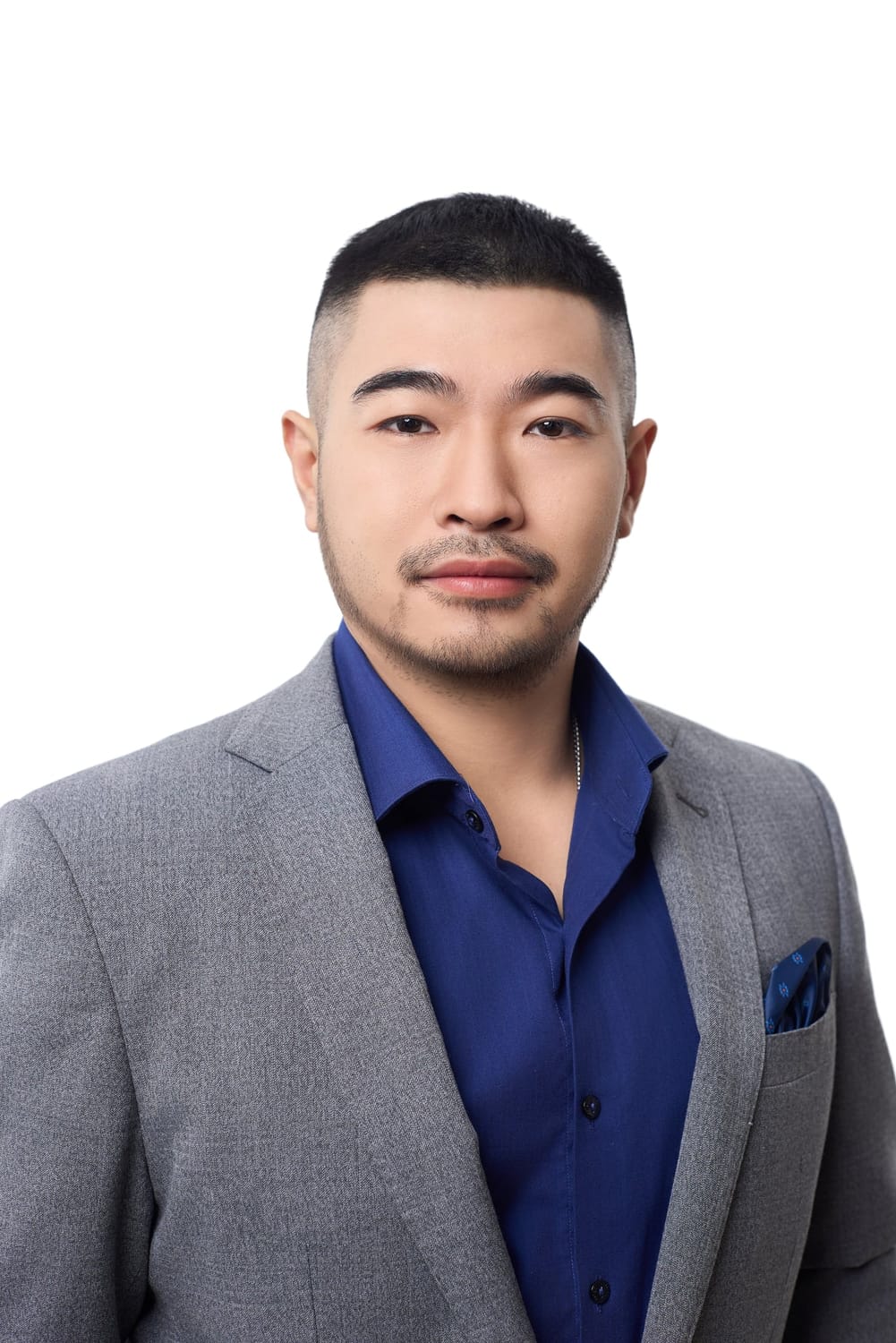
US visa photo regulations 2026 per the U.S. Department of State: photo is square 5x5cm (2x2 inch), digital file 600-1200 pixels in JPEG format with maximum 240KB, pure white background, neutral expression with closed mouth, no glasses (banned since 11/2016), photo taken within the last 6 months. Face fills 50% of photo height. Photos not meeting standards are one of the common rejection reasons — despite the technical requirements being fairly simple.
This article compiles complete US visa photo regulations 2026 — size, background, expression, DS-160 digital file, and the 7 most common reasons photos get rejected. Figures are aggregated from public documentation at travel.state.gov and actual US visa application processing observations at Gạo Nâu Profile.
Quick Summary — US Visa Photo Regulations 2026
- Print size: 5x5cm (2x2 inch), 1:1 square ratio
- DS-160 digital file: 600x600 to 1200x1200 pixels, JPEG, ≤240KB
- Background: Pure white, no patterns, no shadows
- Expression: Neutral, mouth closed, eyes looking straight at camera
- Accessories: NO glasses (including sunglasses and prescription glasses), NO hats, NO scarves (except religious)
- Validity: Taken within 6 months of DS-160 submission
What Is the Standard US Visa Photo Size?
US visa requires square photo of 5x5cm — equivalent to 2x2 inches. This is a major difference from most other visa types worldwide: while Schengen, Japanese, and Korean visas use rectangular sizes (3.5x4.5cm), US visa is the only popular square size.
5x5cm Print — Physical Requirements
Printed photos used at the US Embassy Hanoi or U.S. Consulate Ho Chi Minh City interview must meet:
- Exact physical size 5x5cm (±0.5mm tolerance acceptable)
- Printed on specialized photo paper (glossy professional photo paper)
- Newly printed within 6 months (no reused old photos)
- Not folded, no stains, no notes on the back
DS-160 Digital File — Technical Specifications
The digital file uploaded on DS-160 (Non-immigrant Visa Application form) has stricter requirements:
| Specification | Exact Requirement |
|---|---|
| Resolution | 600x600 pixels (minimum) to 1200x1200 pixels (maximum) |
| Ratio | Square 1:1 (any deviation will be rejected) |
| Format | JPEG (PNG, WEBP, HEIC, TIFF not accepted) |
| File size | Maximum 240 KB (~240,000 bytes) |
| Color space | sRGB (not CMYK) |
| Color depth | 24-bit (color) or 8-bit (grayscale) |
| Compression | Avoid heavy compression that breaks the image |
Important note: The DS-160 upload system uses AI for automatic analysis. The system measures the face ratio in the frame, eye position, distance from top of head to chin. Deviations beyond the allowed threshold return “Photo does not meet requirements” and require re-upload.
US Visa Photo Background — How Pure White?
The U.S. Department of State defines the US visa photo background as “white or off-white” — pure white or bright light off-white. In practice, “pure white” has 3 specific requirements:
- No patterns — no brick walls, no textures, no gradients
- No shadows — no shadows from head, shoulders, or face edges falling onto the backdrop
- No other details — no people, no objects, no light reflections
Gray, cream, light yellow, light blue backgrounds — even if just 1 tone off white — are not accepted. This is different from UK visas (accept light gray) or Canada visas (accept gray or light white).
Face Rules in US Visa Photos
Face Ratio in the Frame
Face must fill 50-70% of the frame’s height, measured from top of head to chin. Specifically:
- Distance from chin to top of head: 1 inch (25mm) to 1.375 inch (35mm) on the 5x5cm print
- Eyes must be positioned from 1.125 inch (28mm) to 1.375 inch (35mm) measured from the bottom of the photo
- Shoulders must be partially visible, face not cropped tight to the edge
Expression — Neutral Required
This is the strictest US visa requirement:
- Mouth closed, no smile (including closed-mouth smile)
- Neutral, natural expression
- Eyes open normally, looking straight into the camera
- DO NOT squint, DO NOT smirk
This rule differs from Vietnamese citizen ID photos (allow closed-mouth smile) or Taiwan visa photos (allow slight smile).
Eyes, Glasses, Hair, Accessories
| Element | US Visa Regulation |
|---|---|
| Glasses | NOT allowed (including prescription, sunglasses) — except medical with doctor’s note |
| Hats, scarves | NO (except religious attire — Hijab, turban) |
| Hair | Neat, not covering eyebrows, not covering part of the face |
| Ears | At least 1 should be clearly visible |
| Jewelry | Allowed but not excessive (not covering face) |
| Makeup | Allowed but light, not changing appearance |
| Filters, retouching | NOT allowed to use filters that smooth skin, slim face, change eye color |
Uploading US Visa Photo on DS-160 — Technical Process
DS-160 is the U.S. Department of State’s non-immigrant visa application form, completed online at ceac.state.gov/genniv. The photo upload process has 4 steps:
- Step 1 — Prepare file: photo must meet exact specs of 600-1200px, JPEG, ≤240KB. If the file is too large, use an online compression tool like TinyJPG (don’t use compression that breaks the image)
- Step 2 — Test upload: the system has a “Photo Tool” allowing you to check the photo before submitting the official DS-160. Use this tool to verify
- Step 3 — Auto-crop: if the photo isn’t square, the system suggests cropping. Accept if the result maintains correct face ratio
- Step 4 — Save and submit: after DS-160 accepts the photo, save the confirmation page (with barcode) — this is the document to bring to the interview
If the system reports “Photo cannot be used” at step 2 → return to editing or reshooting. DO NOT force upload — the system will flag the application.
7 Common Reasons US Visa Photos Get Rejected
Based on actual US visa application processing observations at Gạo Nâu Profile, here are the 7 most common rejection causes (ranked by frequency):
| # | Mistake | Prevalence | Prevention |
|---|---|---|---|
| 1 | Background not white enough | Very High | Shoot at a studio with professional backdrop, don’t shoot at home |
| 2 | Slight smile, mouth open | Very High | Ask the photographer to guide neutral expression |
| 3 | Wrong digital file size | High | Verify file meets 600-1200px JPEG ≤240KB before upload |
| 4 | Wearing glasses (including prescription) | High | Remove glasses before shooting, even if you wear them regularly |
| 5 | Hair covering eyebrows/face | Medium | Tie hair neatly or use clips |
| 6 | Shadows on background | Medium | 2-3 balanced light setup, don’t shoot against light |
| 7 | Photo too old (>6 months) | Low | Shoot anew immediately upon visa decision, don’t use old photos |
Pre-submission check process: Before uploading DS-160, cross-reference the photo with the official USA Photo Requirements Guide at travel.state.gov. If unsure, bring the photo to a studio for verification.
Comparing US Visa Photo With 7 Other Countries
To see how strict the US visa is, compare with 7 other popular countries:
| Country | Size | Background | Smile? | Glasses? | Digital File |
|---|---|---|---|---|---|
| US | 5x5cm | Pure white | NO | NO | 600-1200px JPEG ≤240KB |
| Schengen (EU) | 3.5x4.5cm | Bright white | NO | Yes (non-reflective) | 450x600px JPEG |
| United Kingdom | 3.5x4.5cm | Gray or cream | NO | Yes | 600x750px JPEG |
| Japan | 4.5x4.5cm | White | NO | Yes | No specific requirement |
| Korea | 3.5x4.5cm | White | Slight smile OK | Yes | 300dpi |
| Australia | 3.5x4.5cm | White/gray | NO | Yes | Not specified |
| Canada | 3.5x4.5cm | White/light gray | NO | Yes | 420x540px |
| Taiwan | 3.5x4.5cm | White | Slight smile OK | Yes | Not specified |
Conclusion from the comparison: US visa has the strictest regulations in 3 areas: unique square size, absolute glasses ban, and digital file with clear size limits. This is why you should shoot US visa photos at a professional studio, not at home.
Preparing Before US Visa Photo Shoot
Good preparation before the shoot helps meet standards on the first try — no reshooting:
- Outfit: collared shirt, dark neutral color (navy, dark gray, black). Avoid white (blends with background), avoid busy patterns, avoid low-cut tops for women
- Hair: tie neatly or trim a few days before. Ensure no baby hairs covering eyebrows
- Skin: don’t heavily retouch yourself. If skin has red pimples — use a face mask 1-2 days before, don’t cover with heavy makeup
- Jewelry: remove large earrings, necklaces visible outside collar, reflective watches
- Eyes: if you wear prescription glasses regularly — practice removing them 1-2 hours before shooting so eyes adjust
- Documents: bring citizen ID/old ID so photographer can verify name and cross-reference information
- Mindset: relax, don’t worry. Tense expression will show on your face
US Visa Photography at Gạo Nâu Profile — 4-Step Verification Process
At Gạo Nâu Profile, every US visa photo session goes through a 4-step verification process before deciding to print and export files:
Step 1 — Measure face ratio: photographer uses overlay grid on screen, measures chin-to-top distance, eye position, ensuring within the 50-70% frame height range.
Step 2 — Background check: zoom into face edge, check for shadows, check for color gradients. If anomalies are detected, adjust flash or change backdrop.
Step 3 — Compare with standard sample: compare client photo with standard sample from travel.state.gov. Check expression, eye position, no glasses, neat hair.
Step 4 — File export: create 2 parallel files — printed file 5x5cm and digital file 600-1200px JPEG ≤240KB. Both are tested on DS-160 Photo Tool before client delivery.
The process completes in 30 minutes, including shooting, checking, light retouching, and file export. Client receives:
- 4 printed photos 5x5cm on DNP professional photo paper (30-year non-fade standard)
- 1 digital JPEG file meeting DS-160 standard via email
- 1 backup file on USB if needed
Book a US Visa Photo Appointment at Gạo Nâu Profile
Gạo Nâu Profile has 3 branches serving clients needing US visa photos — see detailed addresses at the Hanoi branch, HCMC District 10, and HCMC District 3 pages.
Simple booking process:
- Call hotline or inbox Facebook to choose branch + time slot
- Arrive at the studio on time — no additional preparation needed
- Shoot + check + receive printed photo + digital file within 30 minutes
Last updated: 22/05/2026 — per Travel.State.Gov and the latest DS-160 regulations from the U.S. Department of State.